Ashampoo Droid Optimizer 1.1.0 / Screenshot Snap Free 1.2.2
This post was published 10 years ago. Download links are most likely obsolete. If that's the case, try asking the uploader to re-upload.
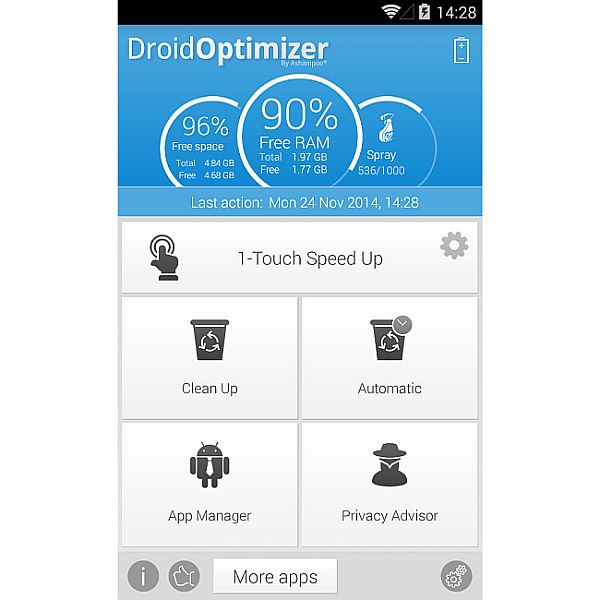
Ashampoo Droid Optimizer 1.1.0 / Screenshot Snap Free 1.2.2 | 11.0 Mb
Does your smartphone feel incredibly slow? Does launching apps take forever? Is your battery always empty? Then, its time for a cleaning. The free Ashampoo Droid Optimizer app helps keep your smartphones and tablets fast and clean. The app terminates running apps and background apps automatically and provides an instant memory and performance boost.
With continued use, your smartphone gets cluttered with temporary files. Ashampoo Droid Optimizer empties system and application caches and clears your browsing history to free up space. You can also find and delete huge files easily.
If youd like to know exactly what permissions your installed apps really have on your device, Ashampoo Droid Optimizer is ideal for you. Information on critical permissions is displayed in great detail and spy apps are easily exposed.
Finally, the app also helps you conserve battery life. It achieves this by automatically disabling non-critical features during customizable time periods. This way, you can have WLAN and mobile connectivity turned off at night and automatically re-enabled in the morning for instant availability.
Features Ashampoo Droid Optimizer
• Terminate foreground and background apps automatically
• Empty the system and application cache
• Clear your browsing history for better privacy
• Find and delete big files fast and easily
• Carry out cleaning tasks automatically
• Conserve energy and enhance your battery life
• Manage all installed apps
• Learn about your apps critical permissions and expose spy apps
New in Droid Optimizer version 1.1.0 (30-09-2015)
• New: 1-Touch Speed Up Widget (Size 1x1)
• New: Rooted devices can toggle airplane mode (Android 4.2+) and also mobile data connection (up from Lollipop)
• Improved Android 5 and 6 compatibility
• Fixed error on high resolution devices
OS: Android 2.3+
Ashampoo Snap for Android is a fully-fledged mobile application to capture, edit and share screenshots and images on your Android device.
Capture screen contents, take photos with your built-in camera or simply load existing images and add stylable arrows, shapes, stamps and texts to get your point across. And when you're finished, share your images through any installed file services (EMail, Picasa, Google+, etc.).
Save and store what you see
Imagine you are browsing Facebook and come across a hilarious post or chat message that could very well be the next epic chat fail. Just take a screenshot and remove sensitive information with Snap for Android and come back to it later.
Record and document unforeseen events on the spot
Don't just rely on your memory alone! Use Snap for Android to record and document unfavorable situations such as car crashes and add arrows and notes to detail the sequence of events that caused them.
Record thoughts and ideas right in your photos
Snap for Android gives you a set of creative tools to draw and write on your images. Enhance your vacation snaps and tell your friends exactly where your room was during your last stay or which places you particularly liked on that beach. Just mark the spots right in your photos with Snap for Android.
Share images with anyone
Use the integrated Ashampoo Web upload and share unique Internet links with others. Your images will be accessible through any web browser and automatically expire after 30 days so your images won't stay online forever. Of course, Snap for Android also supports all built-in sharing capabilities including Facebook and Google+.
Features Screenshot Snap Free
Capture
• Instant-ready: No manual launching required (background service)
• Notification Bar status messages
• Smart trigger: Screenshots taken through Android-default hardware key combination auto-open in Snap for Android
• System integration: Use "Open with Snap" in other apps, import and edit images through Gallery, take and modify camera snapshots
Edit
• Pan/Zoom
• Draw arrows
• Draw rectangle/ellipse/line shapes
• Stamps (cliparts)
• Marker
• Pen
• Add text
• Crop image
• Scale canvas
• Shadow/outline support: Arrows, Texts, rectangles, ellipses, lines
Share
• Set edited images as wallpaper in launcher
• Supports all installed sharing capabilities (Facebook, Google+, Picasa, Twitter etc.)
New in Screenshot Snap Free version 1.2.2 (10-05-2015)
• New stamps!
OS: Android 4.0+