Synchredible 4.304
This post was published 10 years ago. Download links are most likely obsolete. If that's the case, try asking the uploader to re-upload.
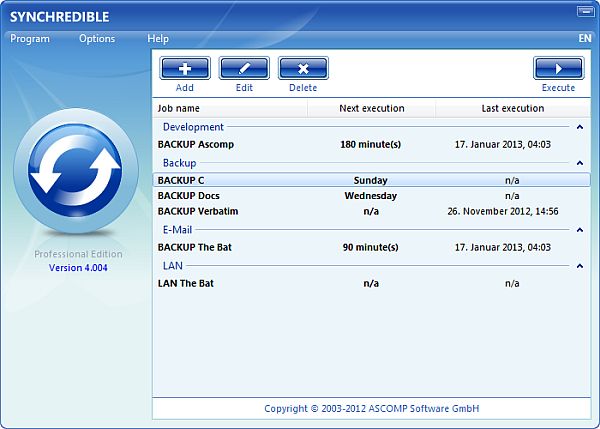
Synchredible 4.304 | 6.2 Mb
Synchredible is a highly intuitive piece of software that gives you the possibility to back up files and folders in several methods, as a security measure in case of data corruption, loss or theft.
Simple setup and intuitive interface
It's free for non-commercial use, wrapped up in a comfortable-looking interface, and ideal for less experienced users. At the same time, it reserves a long range of advanced features for experts, options which are commonly found in paid applications.
After a swift setup operation that shouldn't give you any trouble, you are welcomed by a user-friendly interface, where you can use a wizard and follow seven steps to create tasks with all the necessary settings.
Create and manage sync jobs
Synchredible has a built-in task manager, thus giving you full control over the sync jobs. Once you indicate two disk drives or directories, you can ask the program to copy all items from one folder to another, or to equalize the two directories by copying back and forth any missing files until both locations have identical content.
Customize a wide range of preferences
There's a wide range of applicable filters, so make sure to take your time to figure out what each option stands for. For example, it's possible to delete redundant files and folders, ask the utility to compare file contents in order to skip any duplicates that unnecessarily take up space, as well as exclude specific files or file extensions.
Schedule tasks and study reports
The sync jobs can be set to run immediately, manually, or scheduled. Synchredible is also capable of performing automatic actions before or after the task, like shutting down the computer, showing a text message, or opening a file. It lets you preview the list of all files up for synchronization, offering you the chance to exclude or add new ones. At the end, it compiles reports which can be sent via email.
Conclusion
The software utility carried out sync jobs pretty fast in our tests, while using a decent amount of system resources. It certainly contains an impressive rich of features for a free backup and sync program, and it's definitely worth looking into.
Whats New in version 4.304 (10/27/2015)
- official site does not provide any info about changes in this version
LIMITATIONS IN THE UNREGISTERED VERSION
10-second nag screen on program start
FEATURES
• Easy to use data synchronization:
• Synchredible synchronizes your data/folders the easy way: several assistants support you on defining scheduled jobs for data synchronization and data backup. Network support is integrated for data synchronization between local area networks (LAN).
• Real synchronizations:
• Synchredible supports both synchronizations in one and two directions. Our software recognizes any changes automatically and creates protocols of new and changed data.
• Synchronization as backup strategy:
• You can use Synchredible not only for data synchronization of files and/or folders, but also for data backup operations onto internal or external drives (USB1.1/2.0 supported).
OS: Windows XP / XP 64-bit / Vista / Vista 64-bit / 7 / 7 64-bit / 8 / 8 64-bit / 2003 / 2008 / 2008 64-bit / Server 2012 / 10 / 10 64-bit