Praat 6.0.00
This post was published 10 years ago. Download links are most likely obsolete. If that's the case, try asking the uploader to re-upload.
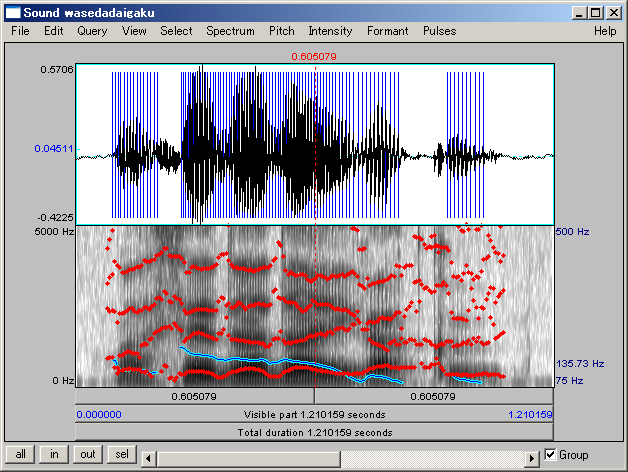
Praat 6.0.00 | 12.6 Mb
Praat is a carefully created software solution aimed at those who want to analyze, synthesize and manipulate speech. Moreover, with this tool you can generate high quality images which you can export and insert into scientific papers or personal studies. The application doesn’t rely on looks to do its job and you should be aware of this before you dive into it. It’s comprised of two main windows, one that allows you to manage the project itself and the other which houses the image you create after processing the audio.
Speech analysis
To create a short list of what this implies, Praat enables you to perform spectral, pitch, formant and intensity analysis, as well as study jitter, shimmer and voice breaks. Praat is designed for those who are at least familiar with how a soundwave looks and how it can be processed, although, if this is not the case, the application supplies rich and elaborate documentation which you can study.
A spectrogram that is associated with a loaded audio file is displayed in an editor and it’s from there that you can access the tools needed to perform the aforementioned analysis types. Though the interface design is rudimentary, Praat gains in the fact that it is purpose orientated, meaning that a feature is not made to look good but function properly and deliver accurate results.
Convert audio files
Since Praat works solely with audio files, it’s appropriate that it offers you the means to convert files into different formats or enhance certain characteristics that they have. With it, it’s possible to export a loaded audio file into WAV, AIFF, AIFC, NIST or FLAC format, as well as to a raw 16, 24 or 32-bit raw endian file.
Apart from this, you can also convert a track to mono or stereo, extract all its channels or a single one and resample it with a different frequency.
A powerful audio processing tool
With the above to consider and much more to discover about Praat, it’s safe to say that if you’re familiar with the technical implications of speech analysis and want to study it in depth then it is a more than capable tool.
FEATURES
Speech analysis:
spectral analysis (spectrograms)
pitch analysis
formant analysis
intensity analysis
jitter, shimmer, voice breaks
cochleagram
excitation pattern
Speech synthesis:
from pitch, formant, and intensity
articulatory synthesis
Listening experiments:
identification and discrimination tests
Labelling and segmentation:
label intervals and time points on multiple tiers
use phonetic alphabet
use sound files up to 2 gigabytes (3 hours)
Speech manipulation:
change pitch and duration contours
filtering
Learning algorithms:
feedforward neural networks
discrete and stochastic Optimality Theory
Statistics:
multidimensional scaling
principal component analysis
discriminant analysis
Graphics:
high quality for your articles and thesis
produce Encapsulated PostScript files
integrated mathematical and phonetic symbols
Programmability:
easy programmable scripting language
communicate with other programs
(the sendpraat source code)
create hypertext manuals with sound I/O
New in version 6.0.00 (October 29, 2015)
• Windows: removed Praatcon.exe, because Praat.exe can now be used from the command line.
• Praat can now open files from the command line on all platforms.
• The API change that requires raising the major Praat version to 6: no longer any need for Praatcon.exe, because Praat itself can now run a script from the command line on all platforms.
• See Scripting 6.9. Calling from the command line for all co
OS: Windows 2K / XP / XP 64-bit / Vista / Vista 64-bit / 7 / 7 64-bit / 8 / 8 64-bit / 10 / 10 64-bit