ControlMyNikon Pro 5.3.0.93 Multilingual
This post was published 9 years ago. Download links are most likely obsolete. If that's the case, try asking the uploader to re-upload.
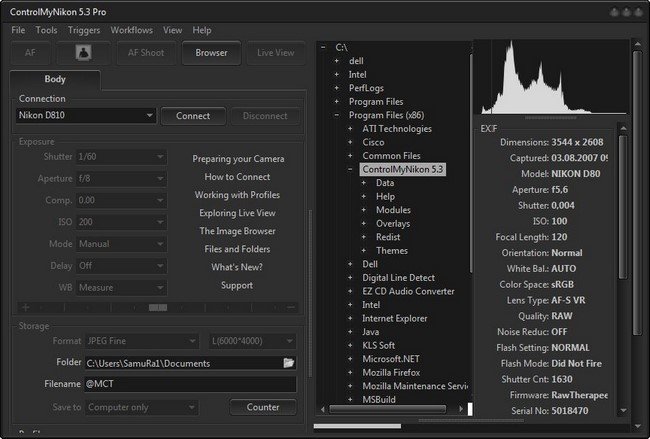
ControlMyNikon Pro 5.3.0.93 Multilingual | 47.39 MB
Connect your Nikon DSLR to your PC and experience new ways to capture images. Macro photography, timelapses, stop motion, HDR, long exposures, portrait sessions, product and laboratory sessions just got a lot easier.
FLEXIBLE...
ControlMyNikon can handle simple remote control of your camera to complex technical shoots. Originally created to shoot bettter flower images, it found it's way into studios, movie sets, laboratories, hospitals, museums, schools, marketing firms and backyards. It has become a standard worldwide. This was unexpected. And wonderful.
AND SERIOUS...
Support for barcode scanners, motorized rails, 3D Controllers, control by external apps and many ways to trigger the shutter makes your technical shoot easier. Think scanning a product barcode before shooting with the data embedded in folder and filenames and metadata. Or accurately framing and focusing an artifact on your computer monitor instead of the tiny camera LCD.
...YET FUN
Backyard birds, hobbies and family shots can all benefit from ControlMyNikon's features. It can even figure out which cat isn't using the litter box. The setup: ControlMyNikon with live view motion trigger and high ISO in the middle of the night. Perpetrator identified. Cat not pleased. This really happened. So tether away, and have fun!
New in Version 5:
LIVE VIEW AS IT WAS MEANT TO BE
By viewing your camera's live view on your computer monitor in a window or full screen, you greatly reduce re-shoots and post-processing time by ensuring that you got it right before you take the shot. Sometimes you can't even see the LCD because it is on a copystand/tripod/boom. You can remotely autofocus or manually adjust the focus. Even zoom in and out so that you can confirm the focus is tack-sharp. Optionally, you can apply an overlay or review the exposure with the live histogram. Nikon DSLR tethering has never been easier.
HIGH-VOLUME WORKFLOWS MADE EASY
Perfect for those product, school, lab or other shoot that requires accurate record keeping. With the batch shooting feature, you can import a data file in advance of your shoot or query a live database and have ControlMyNikon embed the data into your image filename, folder name and metadata. If you don't have a data file, you can embed the barcode instead.
ADJUST SETTINGS REMOTELY
WIth tethering, you avoid the problem of the nudging your carelfully composed shot when you need to adjust camera settings. Just set it on the ControlMyNikon screen and you are good to go. You can also save your settings in a profile so you can re-use it again later. You could have one profile for macro, another for landscapes and even another for those tricky HDR shots. So you can just tweak the settings, shoot, and the image is automatically transferred to the computer.
FLEXIBLE FILE AND FOLDER NAMES
Take advantage of ControlMyNikon's extensive options for naming files and folders. Use numbering, dates and even embed data from batch shooting sessions. File and folder names modified by a barcode? Yes, it can do that too.
REALLY, REALLY USEFUL TRIGGERS
Command ControlMyNikon to capture an image or movie simply by using your voice, web browser, electronic sensor, sound, powerpoint remote or keyboard. Or, you can create a live view motion trigger. Just draw a target zone in the live view screen and the trigger will activate when motion is detected in the zone. Now you can literally capture images of those elusive backyard birds while you are off doing something else. Many of our users do this, with great results.
BUILT-IN IMAGE BROWSER
Use the included image browser to review your images. Zoom in and confirm focus, zoom out to confirm composition and exposure. Check out the tutorial video here. And if you would prefer, you can still use your favorite image browser.
What's New in Version 5.3
• New - Bodies: Added Nikon D7200 support
• New - Bodies: Added Nikon D810A support.
• New - Bodies: Added Nikon D500 support.
• New - Bodies: Added Nikon D5 support.
• New - Bodies: Added Nikon 1V3 support.
• Themes - New Feature: Added theme brightness slider option.
• Themes - Bugfix: When you select text in an edit box, the background of the selection is the wrong color (usually blue). *Fixed.
• Themes - Bugfix: The app window briefly flashes white on app startup. *Fixed.
• Themes - Bugfix: When the app starts, or you change themes, there is a lot of screen flashing/redraws. *Fixed.
• Help - Bugfix: When the .html association being other than a web browser, it would cause the display of an unreadable helpfile (usually in Notepad). *Fixed. Help is now launched in a built-in html viewer, instead of the default browser.
• Preferences - Misc: Added settings for the body communication event polling frequency, as well as the command queue delay between commands. This will be useful in fixing failed connections and connection lockups on some body/pc combinations.
• Supported OS's - WinXP: Windows XP is no longer supported starting with version 5.2 and higher. The last version of ControlMyNikon to support Windows XP is, and always will be version 5.1.
• Live View Monitor - Bugfix: When opening the live view monitor from the popup menu, it sometimes creates a second, blank monitor window which should not be there. **Fixed.
• Live View Overlay - New Feature: You can now use .png overlays, and ControlMyNikon now ships with three overlays and a template in the \overlays folder.
• Live View Overlay - New Feature: You can now rotate overlays.
• Live View Image Quality - New Feature: You can now set the image quality. This only affects the image that is streamed during live view and displayed on your monitor. It does not affect the captured image or movie quality or dimensions. Since Nikon live view was introduced, this has been set to 640x420 JPEG Basic. The new D5 and D500 can use JPEG Fine Quality and has an option for 1024x768. You'll need a fast computer and USB3.0 port to stream JPEG Fine at 1024x768 due to there being up to 40 times the data being transferred compared to the lower resolutionn modes. A fast computer to be able to decode that image stream and display it quickly. The live view image size must be set when live view is not active. The setting is saved to profiles. You can find this setting under the menu item View/Live View Image Quality.
• Shortcuts - Bugfix - If you change a shortcut and then click on the close button, it doesn't save your changes. **Fixed.
Supported Operating Systems: Windows 10, 7, 8/8.1 (32 and 64-bit), Vista (32-bit)