Portable Human Balance GraphicsGale 2.04.09
This post was published 9 years ago. Download links are most likely obsolete. If that's the case, try asking the uploader to re-upload.
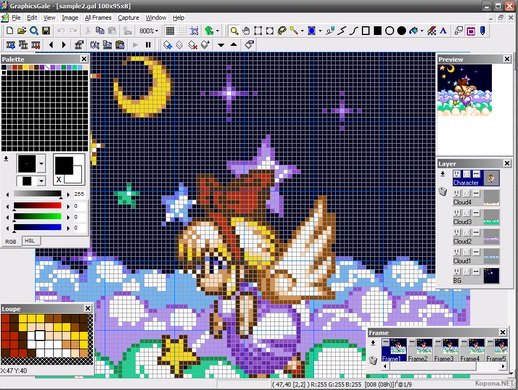
Portable Human Balance GraphicsGale 2.04.09|Windows(x86/x64)|rar|13 mb
GraphicsGale is a powerful tool for spriting and pixel art.
Attention!
Dear users! We do not forget about our rights holders!
All portable assembly, designed exclusively for the promotion of the software and can be used for informational purposes only!
After testing the program and decide on the usefulness and necessity of you, this software - you are required! remove the assembly and turn to the developer, to purchase a license for a full version. Good luck!
Work on Windows 10 is POSSIBLE, BUT NOT GUARANTEED!
Attention!
Dear users! We do not forget about our rights holders!
All portable assembly, designed exclusively for the promotion of the software and can be used for informational purposes only!
After testing the program and decide on the usefulness and necessity of you, this software - you are required! remove the assembly and turn to the developer, to purchase a license for a full version. Good luck!
GraphicsGale is a software for editing raster format image. You can retouch a photo, paint a picture, and so on. Unlike most bitmap editors, GraphicsGale can make an animated image with seeing its preview. This feature must be useful for making an animated GIF or a video game character. Built-in GaleBrowser helps you to see and manage many images on your disk. Animated files are displayed in motion. Also you may convert a file format or an image format of many files quickly by Batch conversion.
Supports many formats, including .ico, .gif, .avi, .cur, .ani.
Preview your animations in real time while editing sprites - No need to stop working to watch your animation!
Use multiple layers to make drawing and editing your art easier!
Onion skinning allows you to see both previous and next frames while your draw!
Output your animation frames onto a single sprite sheet, output each frame to its own image file, or export the entire animation as a single .gif file. GraphicsGale's export options are flexible enough to be compatible with any workflow.
Create work from scratch, or use GraphicsGale's TWAIN imaging support to import images from your scanner, camera, or other TWAIN-supported devices.
GraphicsGale also has many pixel-art specific features to help you create your work quickly and easily, including palette control, selectively erasing colors, and tools for quickly replacing and trying new colors. Download our demo here, and get creating!
Main features
» Multiple frames for an animation
» Multiple layers with an alpha blending
» Real-time preview in editing
» Onion Skin
» Painting tools (Pen, Connect Line, Spline Curve, Rectangle, Oval, Filled Oval, Color Replacer)
» Drawing text (Bordering, Character Pitch, Antialiasing)
» Selecting tools (Rectangular Selection, Oval Selection, Lasso, Magic Wand, Selection By Color)
» Rotate, Stretch, Scroll
» Adjust Color, Grayscale, Various Effects
» Saves to file, Loads from file
» Changes the order of colors
» Makes a gradation
» Removes unused colors
» Unites duplicate colors
» Uniforms colors from multiple files
» Batch conversion
» GIF optimization
» Confirms a file size and an image quality of JPEG
» Outputs an animation as multiple files or a combined file
» Imports multiple files as one image
» Supports SusiePlugin
» Acquires an image from a TWAIN
» Prints multiple frames
» Image Browser
» Customizes shortcut keys
NEW
- Modified Selection tools.
- Fixed a bug when displaying layer thumbnails.
- Modified language system
- Fixed a bug when filling with an image of clipboard.
- Modified 'Paste Layer' to support alpha channel.
- Modified 'Export as combined image' to support alpha channel.
- Added 32bit in bpp list of New window.
- Modified process of pasting a single RGB value.
- [Magic Wand] Modified for an image with alpha channel.
- [Color Selection] Modified for an image with alpha channel.
- [Flood Fill] Modified for an image with alpha channel.
Homepage
System Requirements
IBM or compatible Pentium/AMD processor (900 MHz or greater), 512 MB RAM or greater. 1024 x 768, 16-bit display (32-bit recommended)
Windows XP, Windows Vista all SP, Windows 7, Work on Windows 10 is POSSIBLE, BUT NOT GUARANTEED!
Language (Russian English)