Oasys Suite 14.0 (x64)
This post was published 9 years ago. Download links are most likely obsolete. If that's the case, try asking the uploader to re-upload.
File size: 292.3 MB
The Oasys Suite of software, exclusively written for LS-DYNA, is at the leading edge of the pre- and post-processing markets and is used worldwide by many of the largest LS-DYNA customers. With the release of version 14 the Oasys Suite provides the user with even more tools and functions to reduce the amount of time needed to build and check a LS-DYNA model, allowing the engineer to concentrate more on the actual problem in hand rather than just the task getting a model up and running in LS-DYNA
Oasys REPORTER
Oasys REPORTER is a program that enables fast and convenient post-processing of LS-DYNA results through the use of templates and scripts.
The user creates a report template using Oasys REPORTER, this template forms the basic structure of the report, and defines areas on the pages that are intended for text, pictures or graphs. These are then linked to scripts either user-defined or from the built-in library that will generate the actual content .
When generating a report from a completed template Oasys REPORTER will execute each of the scripts, automatically opening D3PLOT and T/HIS to produce the required images, and place them at the defined position in the report.
Oasys PRIMER
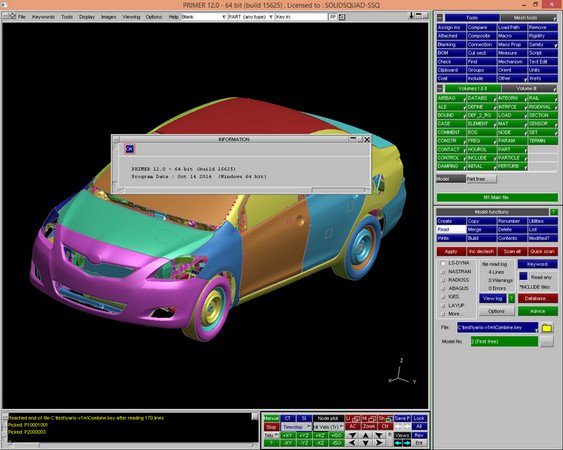
The Oasys PRIMER pre-processor is designed to make preparation and modification of LS-DYNA models as fast and as simple as possible, improving user productivity and efficiency and reducing the time spent manipulating and developing models suitable for LS-DYNA.
Our priority with Oasys PRIMER is to provide complete support for every LS-DYNA keyword. The user can be assured that every model read in and written out will lose no data.
Oasys SHELL
The Oasys SHELL provides the user with an easy method of accessing the individual stages of the LS-DYNA analysis. Oasys PRIMER, T/HIS, D3PLOT, and REPORTER software can all be started from the Oasys SHELL.
Most importantly, there is an advanced LS-DYNA submission shell for submitting analyses which allow the user easy access to the all the various options available when submitting an LS-DYNA run.
It also provides easy access to the Oasys and LS-DYNA manuals.
Oasys D3PLOT
Oasys D3PLOT is a 3D visualisation and interrogation package for post-processing the results of LS-DYNA analyses.
Oasys D3PLOT provides animation, extraction and derivation of over 100 data components, with advanced graphics (including shading, contouring, lighting and transparency). First and foremost however it is an engineering tool which allows users to examine and process any aspect of LS-DYNA analysis results.
With support for multiple models as well as an Oasys T/HIS link window, our post-processor offers unrivalled ease of in-depth analysis, investigation and comparison of many analyses. Oasys D3PLOT reads the binary results databases written by LS-DYNA, including the d3plot (ptf), ctf and xtf files. In addition, the static ztf file written by Oasys PRIMER can be read to allow visualisation of almost all LS-DYNA entities.
Oasys T/HIS
Oasys T/HIS is an XY data plotting package designed primarily for use with LS-DYNA. It can read both the ASCII and binary results produced by LS-DYNA and basic CSV files.
Oasys T/HIS contains a wide range of functions that allow the user to manipulate the data into the format required. These include basic mathematical functions, commonly used filters (e.g. CFC180), and a number of specialist functions for calculating injury criteria in automotive impact analysis (e.g. HIC, VC, THIV).
Release Notes
This new version of Oasys PRIMER includes a number of new features such as:
Support for LS-DYNA R9.0 keywords
Label locking ranges to "fix" specified ID's of entities
New ways to select nodes/elements via path line/area
New methods for fixing contact penetrations
Output of contact information to Excel files
Connections - auto remesh around spotwelds to create heat affected zone
New ways to create and visualise mass and mass distributions
Improved handling of parameters/parameter expressions including speed improvements for models containing many parameters
New pedestrian tool for plotting/contouring HIC results, including area calculations
New measure tool for contouring distances between parts
Improvements to JavaScript tools, including the ability to write Excel files
New meshing tools including a tet-mesher and improved ruled meshing
Ability to access and investigate errors and warnings written to LS-DYNA output files
New check dashboard to give overall "health" of your model
This new version of Oasys D3PLOT includes a number of new features such as:
“PRIMER” style object menus
Simplification of capturing images of graphics windows and menus
New colour-blind and greyscale friendly contour ramps
Blanking can now be set per window
Multiple on-plan integration point data can be plotted
Additional support for Volume 3 features
New streamlines plotting mode for visualising flow
Reduced size PTF files can be generated
Interactive definition of variables for returning to REPORTER
This new version of Oasys T/HIS includes a number of new features such as:
Support for reading new data files
New Javascript functionality for opening models and extracting data
Support for Visual Studio Intellisense for writing Javascripts
Simplification of capturing images of graphics windows and menus
Improved Add(y), Div(y), Mul(y) and Sub(y) operations
Interactive definition of variables for returning to REPORTER
This new version of Oasys REPORTER includes a number of new features such as:
New US-NCAP Front FFB, Side MDB and Side Pole Impact templates
New IIHS Side Impact (MDB) template
New general LS-DYNA model and vehicle templates
Library program output and text can now be mixed in table cells
Rows and columns can now be added or deleted at any location in a table
Cells in tables can now be merged
Table cell borders can now be changed individually
Data can now be returned to REPORTER from D3PLOT and T/HIS as variables
Homepage
Quick check before we show the links
Helps us keep automated scrapers from hammering the filehosts.