NoteItAll 3.1
This post was published 10 years ago. Download links are most likely obsolete. If that's the case, try asking the uploader to re-upload.
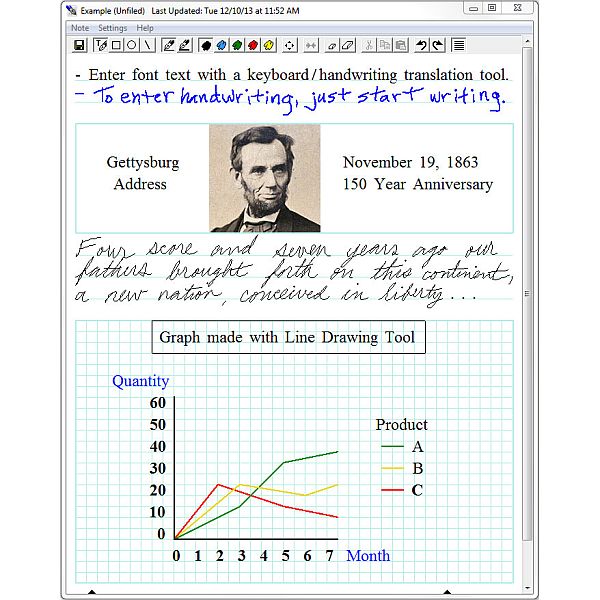
NoteItAll 3.1 | 3.8 Mb
NoteItAll is a FREE, easy-to-use Window® application for taking notes, making sketches/diagrams, annotating images, and creating simple animations / slide shows.
User-friendly interface
Though the subtitle is very accurate, it’s recommended that you first read the manual before beginning to use the application. That’s not because NoteItAll is complicated in any way but rather that it has a different way of doing things, opposed to how you might be used to.
NoteItAll’s GUI is as straightforward as it can be since all the tools you need to create and edit the notes are available in a top toolbar, leaving the rest of the main window available for the content. Tools are accessed with a simple click on their icons and you also have some available through the use of context menus.
Designed for PC and tablet
NoteItAll is an application made to work on both desktop systems, notebooks and tablets meaning that it supports the use of a pen, stylus. This feature makes NoteItAll very practical when it comes to creating sketches, adding annotations to images or scanned documents and similar tasks.
Moreover, you are able to export the projects and transfer them across different platforms. This way it’s possible to work on the mock-up of the sketch on your computer and add annotations to it using your tablet.
Intuitive tools
NoteItAll provides a series of basic drawing and annotation tools that are very easy to use. You have brushes of different sizes and colors, erasers, shape and line tools, as well as the much needed undo and redo options.
With a simple click on the digital sheet of paper you are able to start drawing, holding the left click mouse button enables you to start typing text while the right one brings out a context menu that offers various functions.
Create and edit notes
In closing, there are a lot of functions to discover about NoteItAll other than those that have been mentioned and which make it even more handy. All you have to do, is try it out.
Features
- Simple interface supporting pen (stylus), mouse, and keyboard inputs.
- A 'notebook with sections' metaphor for storing notes.
- Word processing of handwritten and font text.
- Tools for drawing with a pen or mouse.
- Operational with or without an Internet connection.
New in version 3.1 (October 23, 2015)
• The ability to indent blocks of text, allowing for easier list/outline creation.
• Bug fixes.
It works with Windows 7 and 8.x (not RT) tablet, laptop, and desktop computers.
To uninstall an earlier version of NoteItAll
Run the NoteItAll installation program again and choose the 'Remove' option when prompted to modify, repair, or remove the program.
If you do not have the installation program, do the following
For Windows 7:
- Click on the 'Start' button in the lower left corner of your desktop.
- In the window that appears, click on 'Control Panel'.
- In the Control Panel window, click on 'Programs and Features'.
- In the program list that appears, click on 'NoteItAll'.
- Click on 'Uninstall' at the top of the list.
For Windows 8 & 8.1:
- Go to the Search window (click on the search icon or swipe from the right).
- Search for 'uninstall'.
- Select 'Uninstall a program'.
- In the program list that appears, select 'NoteItAll'.
- Select 'Uninstall' at the top of the list.