Adobe XP Support Patch x86 v0.8 Beta by PainteR
This post was published 10 years ago. Download links are most likely obsolete. If that's the case, try asking the uploader to re-upload.
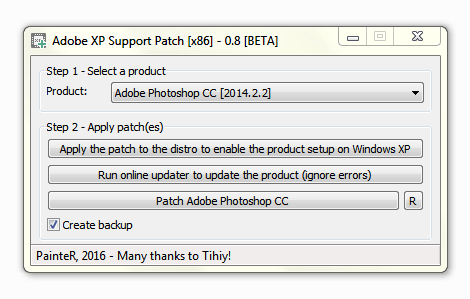
Adobe XP Support Patch x86 v0.8 Beta by PainteR | 3.3 Mb
The patch implements all necessary functions required by Abobe Photoshop to run on Windows XP.
Supported features
Core functions
Improved Content-Aware Fill
Improved Blur Gallery
Shake Reduction
and other new features.
HOW TO iNSTALL:
Note: In the latest version of the application, some features might
not be supported. However, it includes the improved features
of previous versions. Choose functions you really need carefully.
1.1 Install the required Adobe software using a ESD
(Electronic Software Delivery) source.
1.2 If the installation process fails (incompatible version), use
the patch to enable the product setup on Windows XP.
1.3 [Optionally] Use online updater to update the application or install
the update manually: copy the updated files from the virtual machine.
2 Pick the installed application from the list and apply patch.
3 Enjoy!
HOW TO UNiNSTALL:
[if BAK files exist]
1 Select the product from the list.
2 Click the "C" button and select the main executable file.
3 You are done.
SUPP0RTED APPLiCATiONS:
Adobe Photoshop CC 2014.2.2
Adobe Photoshop CC 2014.0
Adobe Photoshop CC 14.2.1
Adobe Photoshop CC 14.0
Adobe Photoshop CS6 13.1.2
Whats New
Updates: official site does not provide any info about changes in this version

